
Best Broken Link Checker: 11 Tools Tested on the Same 3 Sites
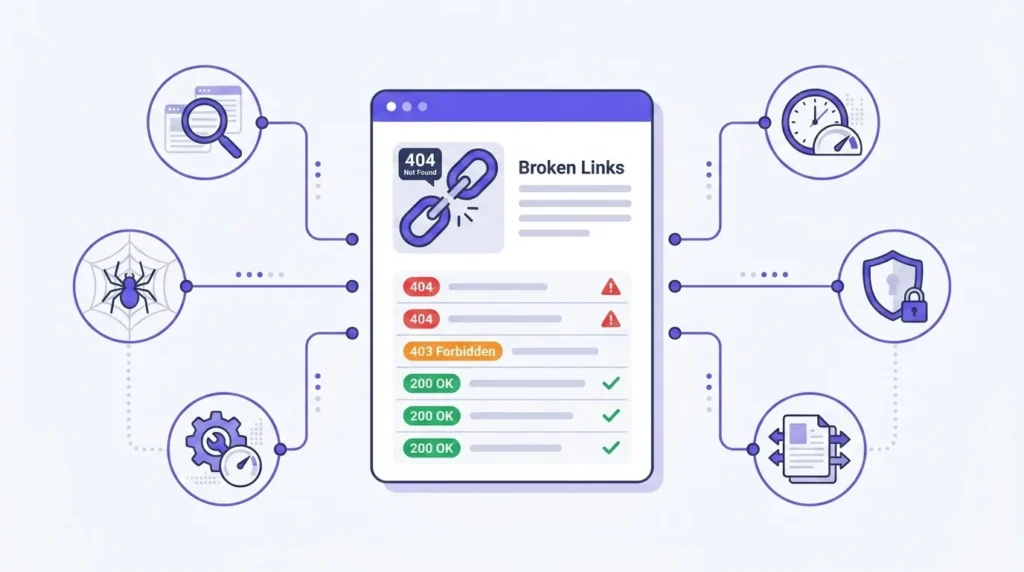
Most “best broken link checker” lists are written by the people who make one of the tools, and almost all of them put their own product first. This one is too — ToolsVale is ours — so we have not ranked it first, and we have written down where it loses. What follows is what each tool actually caps you at, taken from the vendors’ own pages.
Check your own site
Paste a URL and crawl up to 10,000 pages. No signup, no install, and every broken link shows the page it sits on.
Open the free broken link checker
Which broken link checker is best for your situation?
| Your situation | Best fit |
|---|---|
| One-off audit of a large site, no signup, no install | ToolsVale |
| Deep technical crawl with desktop control | Screaming Frog |
| Scheduled monitoring with email alerts | Dr. Link Check or Dead Link Checker |
| Already paying for an SEO suite | Ahrefs Site Audit |
| Quick check of a single page | W3C Link Checker, MiniWebtool or IndexFlow |
| WordPress on hosting that permits plugins | Broken Link Checker plugin |
| WordPress on managed hosting that bans it | Any external crawler |
| Site behind Cloudflare or a strict firewall | A tool that separates 403/429 from 404 |
| Thousands of external URLs at scale | A paid tool with proxy rotation — no free tool handles this |
The single biggest practical difference between these tools is whether the report tells you which of your pages contains the broken link. A flat list of dead URLs is only half a report.
What each tool actually gives you free
Every figure below came from the vendor’s own pricing or documentation page rather than from another comparison article. That matters more than it should: one widely shared list currently states Screaming Frog’s free version caps at 3,000 pages. It is 500, and Screaming Frog says so on their own site.
Free tiers change, so we re-check this table quarterly and date it.
| Tool | Free tier | Paid from | Install | Account | Monitoring |
|---|---|---|---|---|---|
| ToolsVale | 10,000 pages per run, continuable, no link cap | — | No | No | No |
| Screaming Frog | 500 URLs | £199/year | Desktop app | No | Local, paid |
| Dr. Link Check | 1,500 links | Paid tiers | No | Yes | Yes |
| Broken Link Scan | 500 pages | Paid monitoring | No | No | Yes, paid |
| Dead Link Checker | Site crawl | Paid tiers | No | For multi-site | Yes |
| Ahrefs Site Audit | Verified sites only | $99/month | No | Yes | Yes, weekly |
| Sitechecker | 100 pages | Paid | No | Yes | Yes |
| MiniWebtool | 20 pages / 200 links | Premium | No | No | No |
| IndexFlow | 1 page / 50 links | — | No | No | No |
| W3C Link Checker | No stated limit | Free | No | No | No |
| Broken Link Checker (WP plugin) | ~200 links/month, free cloud engine | WPMU DEV plan | Plugin | Yes | Yes |
Three things stand out.
“Free” usually means “free until you hit a number.” Of the eleven, only W3C Link Checker states no cap, and it is slow enough that the practical limit is your patience. Everything else stops somewhere: 20 pages, 50 links, 100 pages, 500 URLs, 1,500 links. If your site is larger than 500 pages — and most real sites are — the majority of these will hand you a partial report and present it as finished.
Links and pages are not the same limit. Dr. Link Check’s 1,500 counts links, not pages, and that includes images, stylesheets and scripts alongside anchors. A page carrying 30 outbound references consumes 30 of your allowance. Tools that cap on links run out considerably faster than the number suggests.
Verification is a barrier for agency work. Ahrefs Site Audit needs you to prove you own the domain, via DNS record or a file upload. That is sensible for a monitoring product and awkward if you are auditing a prospect’s site before you have any access to it.
Why your link checker reports working pages as broken
If you have ever run a link check and got back “broken” links that load perfectly when you click them, this is why.
Free checkers crawl from a single IP address. Sites behind Cloudflare, Sucuri, or a strict rate limiter see a burst of automated requests from one address and refuse them — returning 403 Forbidden or 429 Too Many Requests. The page is fine. The crawler simply was not allowed in.
It is worth being precise, because “false positive” is the wrong word. A 403 does not mean the page is healthy; it means the crawler was not authorised to fetch it. The failure is not that the tool read the status wrongly — it is that the tool collapsed a different condition into the broken bucket. What you want from a report is the correct label, because the right response differs for each.
| Code | What it means | Actually broken? | What to do |
|---|---|---|---|
| 404 | Not found | Usually yes | Redirect, correct, or remove the link |
| 410 | Gone, deliberately | Yes, permanently | Remove the link — it is not coming back |
| 403 | Forbidden — request refused | Usually no | Open it in a browser to confirm |
| 429 | Rate limited | No | Re-check manually later |
| 500 / 502 / 503 | Server error | Often transient | Re-run before acting |
| 301 / 308 | Permanent redirect | No | Fine, but shorten chains over one hop |
| 302 / 307 | Temporary redirect | No | Check it is genuinely temporary |
| timeout | No response in time | Usually no | Often a slow server, not a dead page |
The practical test when choosing a tool: run it against a page you know is behind Cloudflare and see what it calls the result. If it says “broken”, every audit you run with it will contain work you do not need to do.
We should be clear about our own limitation here: ToolsVale crawls from a single IP too, so strict firewalls refuse us as well. What we do is label those as Blocked, separately from genuine breakage, so they do not enter your fix list. That saves time; it does not solve the underlying problem. No free tool solves it — that needs rotating proxies, which is what paid bulk checkers charge for. If a crawler is being refused by your own server rather than a third party’s, it is worth checking your robots.txt before assuming the tool is at fault.
Finding the link is the easy half
A report telling you https://example.com/old-page returns a 404 has done half a job. On a 5,000-page site, the question you actually need answered is: which of my pages links to it?
Most free checkers hand you a flat list of dead destination URLs. You are then left searching your own database for the offending href — which on a large site is slower than the crawl was.
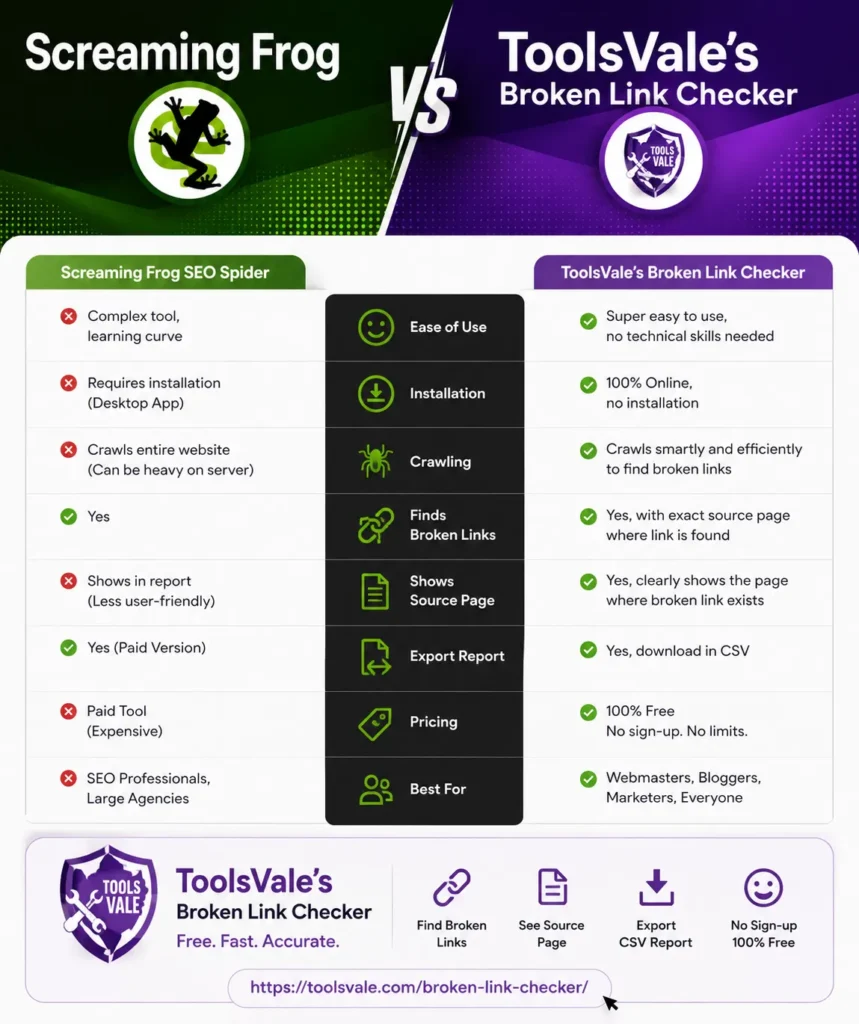
The tools that report the source page turn that list into something a developer can act on directly. Screaming Frog, Ahrefs and ToolsVale all do it; several of the quick web-based checkers do not. If you are handing a fix list to someone else, this single column decides whether the report is useful or just evidence that a problem exists.
What crawlers cannot see
A crawler reads the HTML a server returns. Links that only appear after JavaScript runs are invisible to most of them, and this is rarely mentioned in tool comparisons even though it decides whether your report is complete.
If your navigation, related-posts block or product grid is rendered client-side, a standard crawler will not follow those links. Screaming Frog renders JavaScript on its paid tier; most free web-based checkers, including ours, do not. Neither can any crawler find a true orphan page — if nothing links to it and it is not in your sitemap, there is no path to it. Generating a complete XML sitemap is the only reliable fix for that, because crawlers read it as a starting point.
What “free” costs you in friction
Page limits are the obvious constraint. Friction is the one people notice second, and for an urgent job it decides which tool actually gets used.
Of the eleven tools here, four let you paste a URL and get a result with no account at all: ToolsVale, Broken Link Scan, W3C Link Checker, and Dead Link Checker for a single site. Dr. Link Check, Sitechecker and Ahrefs require registration. Screaming Frog requires a desktop install. The WordPress plugin requires a WordPress installation and an account.
None of that matters when you are planning an audit next week. It matters enormously at two in the morning during a migration, when you need to check a website for broken links immediately and an email verification step is the difference between using a tool and closing the tab.
The WordPress question
If you run WordPress, the standard advice is to install a plugin. The best-known option is Broken Link Checker by WPMU DEV, with over 17 million downloads.
There is a caveat worth knowing before you install it: several managed WordPress hosts do not allow it.
WP Engine lists Broken Link Checker among its disallowed plugins, stating that it overwhelms the server with a very large volume of HTTP requests. That is the plugin working as designed — to check every link on your site, something has to make a request for every link, and doing that from inside your own WordPress installation puts that load on the server your visitors are using.
WP Engine’s own guidance is to use an external tool instead, noting that because such tools are not plugins they have no effect on your site’s performance. That is a hosting provider recommending exactly the architecture an external crawler uses.
The plugin also appears on the disallowed or discouraged lists of Bluehost, Flywheel, GoDaddy, HostGator, Pagely and Pressable. Check your own host’s policy before installing — these lists change.
None of this makes it a bad plugin. On hosting that permits it, the monitoring and one-click fixes are genuinely convenient, and it is the only tool here that lets you fix a link without leaving the WordPress dashboard. But if you are on managed hosting, an external crawler is not merely an alternative — it may be your only option.
Source: WP Engine — Disallowed Plugins
Tool by tool
ToolsVale Broken Link Checker
Our tool. Judged by the same criteria as the rest.
Crawls up to 10,000 pages per run with no link cap, no account and nothing to install. At the page limit, “Crawl more” continues the same crawl rather than restarting it. Every broken link shows the page it sits on plus the anchor text, results stream in as they are checked rather than appearing after a wait, and firewall rejections are bucketed as Blocked separately from genuine breakage. Exports to CSV and Excel.
Weaknesses, plainly: no scheduled monitoring and no email alerts, so it will not tell you when something breaks next month. It does not render JavaScript, so client-side links are invisible to it. It crawls from a single IP, so strict firewalls refuse it. And it is new — there is no public track record or large user base to judge long-term reliability against.
Best for: a one-off audit of a large site, or a post-migration sweep, when you want results now without an account. You can crawl up to 10,000 pages without signing up.
Screaming Frog SEO Spider
The industry standard, deservedly. Extremely detailed crawl data, highly configurable, integrates with Search Console and Analytics, and renders JavaScript on the paid tier. Runs on your own machine, which means your bandwidth and your memory.
Weaknesses: the free tier stops at 500 URLs. The interface is genuinely intimidating on first use. £199/year beyond the free limit.
Best for: technical SEOs and agencies who want control and are comfortable with a desktop crawler.
Dr. Link Check
Cloud-based with scheduled scans and email reports. Checks internal and external links, images, stylesheets and scripts, and flags links to known malicious domains — which nothing else here does.
Weaknesses: the 1,500-link free ceiling arrives fast because it counts every resource, not just anchors. Requires an account.
Best for: ongoing monitoring where you want an email rather than a reminder to run a check.
Broken Link Scan
Cloud-based, no account needed for a scan, with reports grouped by status code. Monitoring on paid plans.
Weaknesses: free scans stop at 500 pages. Focused on links only, not a broader audit.
Best for: a fast free check on a small-to-medium site.
Dead Link Checker
Long-established and simple, free for single-site checks. Multi-site and automatic recurring checks require an account.
Weaknesses: slower than modern alternatives, and the reporting is basic — largely a list of broken URLs.
Best for: occasional checks on small sites.
Ahrefs Site Audit
Broken link detection inside a full SEO suite, with the largest backlink database behind it. Its distinguishing feature is showing which external sites link to your broken pages, which turns a 404 list into a redirect opportunity worth real traffic.
Weaknesses: $99/month, and it requires you to verify domain ownership before it will crawl — which rules it out for auditing a site you do not control.
Best for: teams already paying for Ahrefs.
Sitechecker
Full site audit including broken links, redirect chains, orphan pages and indexation issues. 100 pages free.
Weaknesses: the free tier is small enough to be a demo rather than a working tool.
Best for: evaluating whether you want a paid audit platform.
MiniWebtool and IndexFlow
Both are quick single-page or small-scan utilities. MiniWebtool stops at 20 pages and 200 links; IndexFlow checks one page and 50 links.
Best for: spot-checking a single article before you publish it. Neither is a site crawler, and neither claims to be.
W3C Link Checker
Free, open, no account, no stated limit, and the oldest tool here. It is also single-threaded and slow enough that a large site is impractical.
Best for: checking one page thoroughly, or a small site when time is not the constraint.
Broken Link Checker (WordPress plugin)
Monitors continuously from inside WordPress and lets you edit, unlink or redirect without opening the page. Email alerts included. The free cloud engine is capped around 200 links per month.
Weaknesses: disallowed by several managed hosts, as above, and the free quota is small for a content-heavy site.
Best for: self-hosted WordPress on permitting hosts, where ongoing monitoring matters more than crawl depth.
When ToolsVale is not the right choice
Since we build it, here is the version we would give a friend.
- You need weekly automated monitoring → Dr. Link Check or Dead Link Checker. We do not offer scheduling.
- You need a highly configurable desktop crawler → Screaming Frog.
- Your links are injected by JavaScript → a crawler that renders it. We do not.
- You already pay for Ahrefs → use Site Audit. You have already bought this.
- You want to see who links to your broken pages → Ahrefs. Its backlink database is unmatched here.
- You are checking thousands of external URLs → a paid tool with proxy rotation.
Where we do fit: a large one-off crawl, right now, without installing anything or creating an account — with the source page and anchor text for every broken link.
What no free tool in this comparison can do
Including ours:
- Render JavaScript-injected links, except Screaming Frog on its paid tier
- Discover true orphan pages — nothing links to them, so no crawler can reach them
- Avoid all 403 and 429 misclassification without proxy rotation
- Offer genuinely unlimited free crawling at useful speed
Do any of them have no limit at all?
Effectively no, and that includes ours.
W3C Link Checker states no cap but is slow enough that large sites are impractical. Everything else stops at a stated number. ToolsVale’s 10,000 pages per run is the highest free ceiling here, and “Crawl more” continues the same crawl rather than restarting, but it is still a ceiling.
Limits exist because crawling means one HTTP request per link, and someone pays for that compute. An uncapped crawl still has a practical constraint — crawl speed, server capacity, request rate, or how long you are willing to wait.
Frequently asked questions
What is the best free broken link checker?
It depends on the site. For a large one-off crawl with no signup, ToolsVale checks up to 10,000 pages per run. For desktop control, Screaming Frog is free up to 500 URLs. For scheduled monitoring, Dr. Link Check’s free tier covers 1,500 links.
How can I check my whole website for broken links for free?
Use a crawler rather than a page-level checker, and check its free page limit first — most stop between 20 and 500 pages, below the size of a typical site. Paste your homepage URL, let it follow your sitemap and internal links, then export the results. It helps to generate a fresh XML sitemap first, since most crawlers read it to discover pages.
How do I find broken links without installing anything?
Use a cloud-based checker. ToolsVale, Broken Link Scan, Dead Link Checker and Dr. Link Check all run in the browser. Screaming Frog is the main tool here that requires a desktop install.
Do broken links hurt SEO?
Not as a direct penalty — Google has said 404s are a normal part of the web. The real costs are crawl budget spent on dead URLs, internal link equity that dead-ends instead of flowing onward, and readers who hit a dead end and leave. The exception is a large spike of new 404s after a migration or permalink change, which is worth fixing quickly.
Why does my link checker report working pages as broken?
Almost always a 403 or 429. Free checkers crawl from one IP, and sites behind a firewall or rate limiter refuse repeated automated requests. The page is fine; the crawler was blocked. Check whether your tool separates these from genuine 404s.
How often should I check for broken links?
Monthly for a live site. Immediately after any migration, permalink change or bulk content edit — those are what break links at scale.