
What a 404 error actually is — and the four ways to fix one
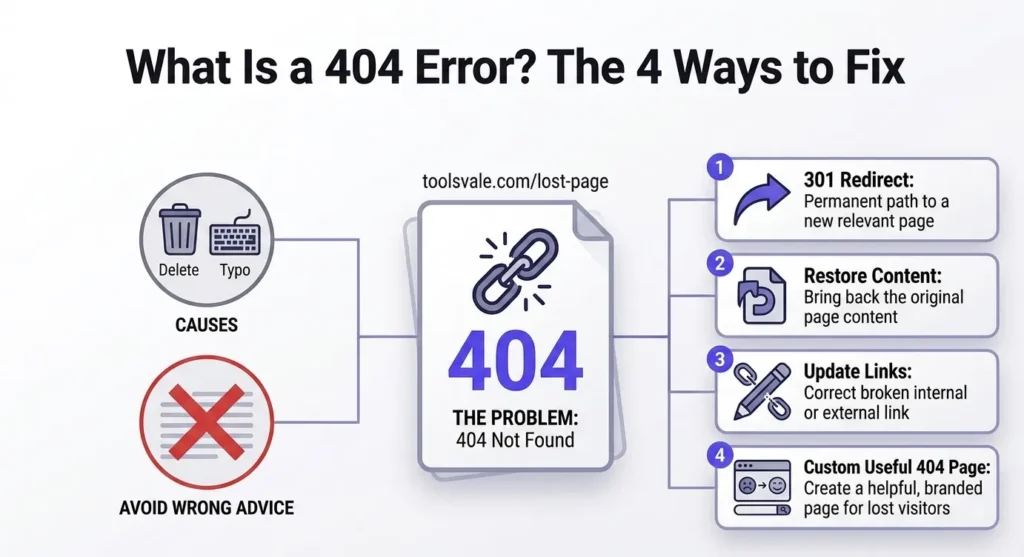
A 404 means the server was reachable and working, but could not find the thing you asked for. That is all it means. It is not a penalty, not a sign your site is broken, and — this is the part most guides get wrong — not always something you should fix.
What a 404 actually is
When your browser requests a page, the server replies with a three-digit status code before it sends anything else. 200 means here it is. 301 means it moved permanently. 404 means the server understood the request, is working normally, and has nothing at that address.
The formal definition from the HTTP specification is that the origin server did not find a current representation for the requested resource, or is not willing to disclose that one exists. That second clause matters more than people realise: a 404 can also be a deliberate choice to say nothing, which is why some sites return 404 rather than 403 for pages you are not allowed to see.
Two things a 404 is not:
- A server failure. That is a 500. If you are getting a 404, the server is up and answering.
- A blocked request. That is a 403 or 429 — the resource exists, you were refused. Confusing these three is the most common source of wasted time in a site audit.
If you are a visitor, not the site owner
This section is short because there is very little you can do, and most articles pad it out considerably.
Check the URL for a typo. Try the site’s own search. If the page existed before, look it up on the Internet Archive’s Wayback Machine. That is genuinely the whole list. Refreshing, clearing your cache and switching browsers will not help, because the problem is on the server and it has already told you what it is.
The rest of this page is for people who own the site.
Where 404s come from
Broken links accumulate for a small number of predictable reasons, and knowing which one you are dealing with decides the fix.
| Cause | What happened | Scale |
|---|---|---|
| Page deleted | Content removed with no redirect left behind | One at a time |
| Page moved | URL changed, old address left to die | One at a time |
| Permalink change | URL structure changed sitewide | Everything at once |
| Migration or replatform | New system, different URL patterns | Everything at once |
| Typo in an href | A link that never worked | One at a time |
| External site changed | Someone else moved or deleted their page | Ongoing, outside your control |
| URL that never existed | Mistyped link elsewhere, or a crawler following a malformed path | Background noise |
The two marked in red are what actually causes a crisis. A permalink change or a migration can invalidate every URL on a site in a single afternoon, which is why the first thing to do after either is a full crawl.
That last row is worth knowing about too. Google notes that you will occasionally see 404s for URLs that never existed on your site at all — someone mistyped a link on their own page, or Googlebot followed something malformed out of JavaScript or a sitemap. Those are not your bug.
Do 404s hurt your SEO?
Not as a penalty. This is worth stating plainly because a large amount of writing on this topic implies otherwise in order to sell something.
404s are a normal part of the web. Pages get deleted; the web is not supposed to be immutable. Google’s guidance is that a 404 is a strong signal to stop crawling that URL, which means a correct 404 actually helps your crawl budget by keeping Googlebot away from addresses that no longer matter.
What genuinely costs you is more specific:
- Internal links pointing at dead pages. Link equity flows through your internal links; a broken one dead-ends it instead of passing it onward.
- External backlinks pointing at dead pages. Someone linked to you and that value is now hitting a wall. This is the expensive one.
- Readers hitting dead ends. They leave, and they trust the site slightly less.
- A large sudden spike after a migration, which is a symptom of something structural rather than a problem in itself.
Note what is not on that list: the mere existence of 404s for pages you deliberately deleted. Those are fine.
The four ways to fix a 404
There are only four, and picking the wrong one causes more damage than the 404 did.
1. Redirect it — but only to a genuinely equivalent page
If the content moved, add a 301 from the old URL to the new one. Both readers and search engines land in the right place and the link equity follows.
The word doing the work there is equivalent. A 301 from a deleted product to a closely related product, or to its category, is reasonable. A 301 from a deleted product to your homepage is not — and Google treats that as a soft 404, which we will come back to.
One caution: Google notes that once it has crawled a URL it may keep trying indefinitely, and a 300-level redirect delays that recrawl, potentially for a long time. A redirect is not a way to make a URL go away quietly.
2. Fix the link at its source
If the link itself is wrong — a typo, an outdated destination, a stale internal reference — edit the href. Do not paper over a mistake with a redirect. A redirect is a permanent piece of configuration you will be maintaining in five years; a corrected link is done.
This is the fix that requires knowing which page the broken link sits on, which is exactly what most link reports do not tell you. More on that below.
3. Restore the content
Obvious, and easy to forget. If the page was deleted by accident, or deleted and then turned out to have backlinks and traffic pointing at it, put it back. Check your analytics and backlink data before deleting anything that has been live for a while.
4. Do nothing — let it 404
This is the fix almost nobody recommends, and it is the one Google actually documents.
If you permanently deleted content and are not replacing it with something related, Google’s guidance is to let the old URL return 404 or 410. That is the correct response. Google currently treats 410 the same as 404, so the distinction matters less than many articles suggest — use 410 if you want to be explicit that removal was deliberate, but do not expect it to behave differently.
Google is direct about the alternatives: do not create fake content, do not redirect everything to your homepage, and do not use robots.txt to block 404s. All three make it harder for Google to understand your site’s structure, and all three are classified as soft 404s.
So “fix every 404” is bad advice. The right question is not how do I make this go away but does anything still point here. If nothing links to it, nothing ranks for it, and nothing was ever there worth preserving — leave it. The 404 is doing its job.
Source: Google Search Console Help — 404 errors
The trap: soft 404s
A soft 404 is a page that tells the user something is missing while telling the server it is fine — a 200 status code on a page with no real content, or a redirect to somewhere that clearly is not what was requested.
This is the failure mode created by trying too hard to eliminate 404s. Three patterns produce almost all of them:
| Pattern | What the server says | Correct fix |
|---|---|---|
| Deleted page still returning 200 with a “not found” message | 200 OK | Return a real 404 or 410 |
| Every deleted URL redirected to the homepage | 301 to an unrelated page | 404 it, or 301 only to a close equivalent |
| Empty category, filter or search page | 200 OK, no content | Return 404, or render something genuinely useful |
You will find these in Search Console under Pages → Not indexed → Soft 404. It is worth checking that report specifically after any bulk cleanup, because a well-intentioned redirect rule is the usual cause.
The underlying principle is simple: the status code should tell the truth about what happened. A missing page saying 200 is a lie, and Google handles it by ignoring the page.
Finding your 404s
Three sources, and they show you different things — which is why using only one leaves gaps.
| Source | Shows you | Blind spot |
|---|---|---|
| Google Search Console | 404s Google has already hit, and which pages link to them | Only what Google has crawled; can lag behind reality |
| A site crawler | Every broken link on your live site right now, internal and external | Cannot see JavaScript-rendered links or orphan pages |
| Server logs | Real 404s real visitors hit, including from external links | Requires access and patience to read |
Search Console is the authoritative view of what is hurting you in search, because it reflects what Google has actually encountered. A crawler gives you the current state of your live site on demand, without waiting for Google to re-crawl. Logs catch the ones nothing on your site links to.
Whichever you use, the column that decides how long the fix takes is the source page. A list telling you /old-guide/ returns 404 is half a report. Knowing that eleven of your published posts link to it — and what anchor text they use — is the half that lets you actually fix it. Our broken link checker reports the source page and anchor text for every dead link, and crawls up to 10,000 pages without an account.
After a migration or permalink change
This is the one situation where speed genuinely matters, because the damage is proportional to how long it lasts.
- Crawl the live site immediately — within 48 hours of cutover, while you still remember what the old structure was.
- Look for patterns, not individual URLs. Hundreds of broken links usually share one bad rule. Fix the rule.
- Check your highest-value pages first — the ones with backlinks and traffic. Those are where a 404 costs real money.
- Map old URLs to genuine equivalents. Where there is no equivalent, 404 it rather than inventing one.
- Regenerate your sitemap so it lists live URLs only. A fresh XML sitemap stops crawlers being sent at addresses you have already retired.
- Re-crawl a week later. Migrations surface problems in waves.
Your 404 page itself
A custom 404 page does not fix anything — the URL is still missing and the status code is still 404, which is correct. What it does is decide whether the visitor leaves or continues.
Worth having: a plain explanation that the page does not exist, your site search, links to the main sections, and your normal navigation and branding so it does not feel like the site broke.
Worth avoiding: an automatic redirect after a few seconds, which is disorienting; a page so clever the reader cannot tell what happened; and — critically — make sure it returns an actual 404 status code. A beautifully designed 404 page served with a 200 is a soft 404, and you have made things worse.
Frequently asked questions
What does error 404 mean?
The server received your request and is working normally, but has nothing at that address. It is different from a 500, which means the server itself failed, and from a 403, which means the resource exists but you were refused access.
Do 404 errors hurt SEO?
Not as a direct penalty. Google treats 404s as a normal part of the web, and a correct 404 helps your crawl budget by signalling that the URL should not be crawled again. The real costs are internal link equity dead-ending, backlinks pointing at missing pages, and readers leaving.
Should I redirect all my 404s to the homepage?
No. Google specifically warns against this and classifies it as a soft 404, because the homepage is not what was requested. Redirect only to a genuinely equivalent page. If there is no equivalent, let the URL return 404.
What is the difference between 404 and 410?
404 means not found; 410 means deliberately and permanently gone. Google currently treats them the same way, so 410 is a clearer statement of intent rather than a functional difference.
What is a soft 404?
A page that tells the user content is missing while returning a 200 status code, or a redirect to somewhere unrelated. Google excludes these from search results. You can find them in Search Console under Pages → Not indexed → Soft 404.
How do I find all the 404s on my website?
Use Search Console for what Google has already found, a crawler for the live state of your site right now, and server logs for 404s that nothing on your site links to. The report you want is the one that shows which page each broken link sits on, not just the dead URL.
How often should I check for broken links?
Monthly on a live site. Immediately after any migration, permalink change or bulk content deletion, since those are what break links at scale.
Find the 404s on your site
Crawl up to 10,000 pages and see the exact page each broken link sits on, with its anchor text. No signup, no install.